Hum a Melody, Get a Finished Song on Your iPhone
Capture a hum on your iPhone and turn it into a fully produced song with vocals, lyrics, and cover art — without ever leaving the app.
It almost always starts the same way. You're in the shower, on a walk, half-asleep — and a melody arrives. You hum it once, twice, sure you'll remember it. By the time you sit down with your phone, it's smaller. By tomorrow it's gone.
For most of music history, that was just how it worked. The songs you didn't write down disappeared. Now they don't have to.
This is a guide to a single, specific workflow: hum a melody into your iPhone, and walk away with a finished song — with vocals, instruments, mix, and cover art. No DAW. No studio. No music theory. Done in under a minute.
The melody-in-your-head problem
Songwriters have always lost more songs than they've written. The melody is the easy part — it just shows up. The hard part is what happens next: capturing it before it fades, turning the fragment into a structure, finding the chords, writing the lyrics, recording the parts, mixing the result.
That workflow used to take weeks and a room full of gear. Today the gear lives in your phone. But until very recently, the phone was still a relay station — record on Voice Memos, export to a laptop, open Logic, hire a session vocalist, mix, master, share. Most ideas died somewhere between Voice Memos and Logic.
What's changed in 2026 is that the entire chain — capture → structure → produce → mix → share — can now happen inside one mobile app. Not as a "demo." As a finished, vocally produced track.
What "hum to song" actually means in 2026
"Hum to song" is shorthand for an AI workflow that takes raw vocal input — humming, beatboxing, la-la-la singing, even whistling — and produces a fully arranged song around it.
Under the hood, two models do the work. The first listens to your hum and extracts the *musical* features: the melodic contour, the implied key, the rhythm, the phrase structure. The second model takes that musical skeleton and generates an instrumental arrangement and vocal performance that fits.
What you hear back isn't your hum looped over a backing track. It's a new song that uses your melody as its DNA. The vocals sing in the key your hum implied. The drums lock to your timing. The chord progression supports your phrase. If you're picky about the result, you can regenerate or extend — but most takes land in the first or second try.
The 4-step flow
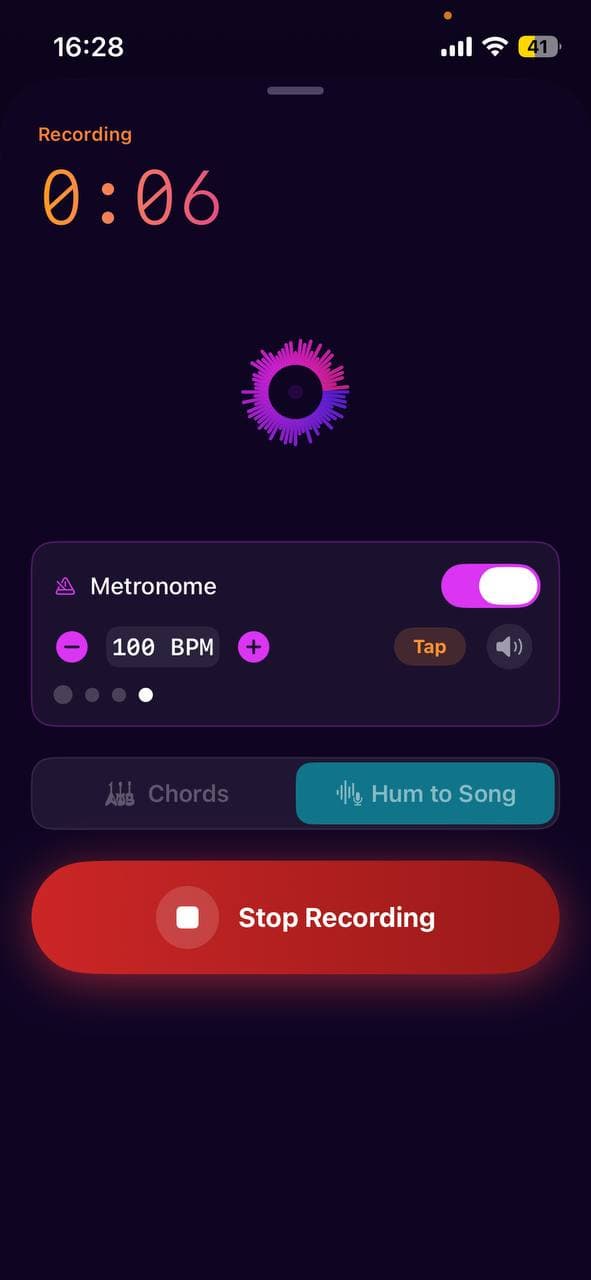
1. Hum. Open the Record tab and tap the big button. Sing, hum, or whistle the melody. Twelve seconds is enough. Twenty is better.
2. Pick a vibe. Tap "Hum to Song" on the resulting recording. You'll be asked for genre (lo-fi, indie, pop, R&B, country, electronic, cinematic, etc.) and mood (dreamy, energetic, melancholy, hopeful…). These two choices steer the AI's arrangement.
3. Generate. Tap Generate. Larka uploads your hum, runs it through the model, and returns a fully produced track in 30–90 seconds. The first time you hear your hum sung back as a real song with real instruments is genuinely strange.
4. Share or extend. If you love it, tap share — Larka exports an MP3 with embedded artwork. If it's close but not quite long enough, tap Extend to push past three minutes. If it's the wrong vibe, regenerate with different mood or genre choices.
What good humming sounds like (and what trips up AI)
The model is forgiving but not magic. A few practical tips from making this work:
Hum a clear phrase, not a vague hum. "La la LA la-la" with intention beats a slow ambient mmm. The model needs pitch contour to extract a melody. Closed-mouth humming is fine; just commit to the notes.
One section is enough. You don't need to hum a whole song. A single hook, a verse phrase, a chorus snippet — that's the seed. The AI grows the rest of the structure around it.
Stay in one key. If your hum drifts (very common), the model picks the dominant key and snaps everything to it. That can subtly change the feel. If you care about a specific key, hum against a held note from a tuner or the Larka metronome's pitch.
Don't worry about timing. The model quantizes loosely — your fluid timing becomes the song's rhythm.
What breaks it: background noise, multiple voices, instrumental backing in the recording, very short fragments (under 4 seconds), or whispered humming with no pitch.
With AI vocals vs. instrumental
When you generate, you choose whether the AI sings real lyrics over your melody, or returns an instrumental backing.
Choose vocals when: you want a finished, releasable song you can share to Instagram or DistroKid. The AI generates lyrics that fit the mood you picked, and a vocalist sings them. Mid-2026 vocal models are surprisingly good — most listeners can't tell.
Choose instrumental when: you want to record yourself singing on top, or you're making background music for a video, or you want to learn the chords to play it yourself. Larka analyzes the result and surfaces the chord progression so you can play along.
Extending a 2-minute take into a 4-minute track
By default, Larka returns clips around 30 seconds (free) or full songs around 2–3 minutes (paid). If the result is great but ends too soon, tap Extend — the model continues the song from where it stopped, keeping the same arrangement, key, and vocal style. You can extend twice; some songs end up at 5+ minutes.
A few extensions tend to land better than one big jump — the model is more coherent over short continuations than over a single long generation.
Why doing this on iPhone matters
On a desktop tool, the workflow is: open browser, log in, navigate, upload, wait, download, open Finder, drag to phone, share. Every one of those steps is friction. Friction is where ideas die.
On iPhone, the workflow is: tap Record, hum, tap Hum to Song, share. That's it. The melody never leaves the device that captured it. The song never has to be exported and re-imported. The whole chain — from the moment in the shower to the link in your group chat — can happen in 90 seconds.
That speed isn't a luxury feature. It's the actual point. The cost of losing a melody isn't measured in dollars; it's measured in songs that never existed.
A worked example
Here's a real one. Hum a 14-second descending melody into Larka — something in your head you can't shake. Pick "lo-fi" + "melancholy". Generate.
What comes back: a Rhodes piano in the same key as your hum, brushed drums quantized to your loose timing, a soft female vocal singing original lyrics about late nights and quiet rooms, mixed to release-quality, with a generated cover of a rainy window in moody blue tones.
Total time from inspiration to a song you could DistroKid: under 90 seconds. Total cost: free, on the free tier, with two AI clips per month. No DAW. No theory. No studio.
Try it once. The first time you do it, you'll understand why we built this.
Be first to try Larka AI
Larka launches on iPhone and iPad soon. Join the waitlist for an early-access link the moment it's live.
Join the waitlist →