AI Cover Art for Your Song: A Spotify-Ready Guide
How to generate album cover art that actually matches your song — and meets every Spotify, Apple Music, and TikTok specification.
Generic AI album cover art is easy. Open any image generator, type "album cover for an indie song," accept whatever comes back. The result will look fine. It will also look like every other AI cover.
Good AI cover art is harder, and it's the difference between a Spotify thumbnail that gets clicked and one that scrolls past. This is the practical guide: what makes cover art good, what specs to hit, and how to generate art that actually matches the song instead of a generic mood board.
What makes album cover art "good"
A good cover does three jobs at once:
It signals the genre and mood instantly. A listener should be able to guess the song's vibe from a 200-pixel thumbnail. Color palette, lighting, subject — all carry that signal.
**It feels specific to *this* song, not any song.** Generic AI covers fail because they reach for category-of-music tropes (vinyl records, microphones, soundwaves) instead of the song's actual emotional content. The song is *about* something. The cover should be too.
It survives at thumbnail size. Test it at 80 pixels. If you can't tell what it is, it's not working. Busy compositions die at small sizes; clear silhouettes thrive.
Spotify, Apple Music, and DSP cover art specs
Quick cheat sheet for the big platforms in 2026:
Spotify — 3000×3000 pixels minimum, JPEG or PNG, square 1:1. Less than 4 MB.
Apple Music — same 3000×3000 square; PNG or JPEG; under 10 MB. Apple is also the strictest about no third-party logos, no URLs, no contact info, and no obscured artwork.
TikTok / Reels — square works, but vertical 9:16 versions perform better in feed. If you're posting the song to TikTok, generate a square version for DSP delivery and a 9:16 crop for video.
SoundCloud — 2000×2000 minimum.
Common rule across all platforms: no text or typography is the safest play. Some platforms allow it; AI-generated text is almost always garbled anyway.
The prompt formula: mood + visual style + concrete subject
Most failed AI covers use one-word prompts ("lo-fi cover", "sad song cover"). The model fills in the blanks with stereotypes.
The formula that works:
[Mood / emotional tone] + [Visual style] + [Concrete subject or scene]
Examples:
- "Melancholy + cinematic film still + a kettle whistling in an empty kitchen at 4am"
- "Hopeful + collage / mixed media + a kid riding a bike toward a hill at sunrise"
- "Tense + minimal Japanese woodblock print + a single phone glowing in a dark room"
The concrete subject is the part most people skip, and it's the part that does the most work.
Eight visual styles and when to use each
Cinematic — film-still aesthetic. Good for narrative songs with a setting. Always feels "important."
Illustrated — drawn rather than photographed. Good for indie, folk, anything playful or character-led.
Abstract — shape and colour instead of a subject. Good for electronic and instrumental tracks, and for songs where a literal image would be too on the nose.
Oil Painting — fine-art aesthetic. Good for orchestral, classical, art-pop.
Neon / Cyberpunk — saturated colours and glow. Good for electronic and synthwave. Bad for anything acoustic.
Minimal — restraint, space, one idea. Good for serious genres like singer-songwriter and jazz. Ages well.
Vintage Vinyl — 60s to 80s record aesthetics. Good for retro genres. Risk: leans pastiche.
Dark Academia — libraries, candlelight, old paper. Good for literary and melancholic songs.
A style is a strong nudge, not a cage. If your written direction asks for something the style would not normally produce, the direction wins.
Letting your song's lyrics and key inform the artwork
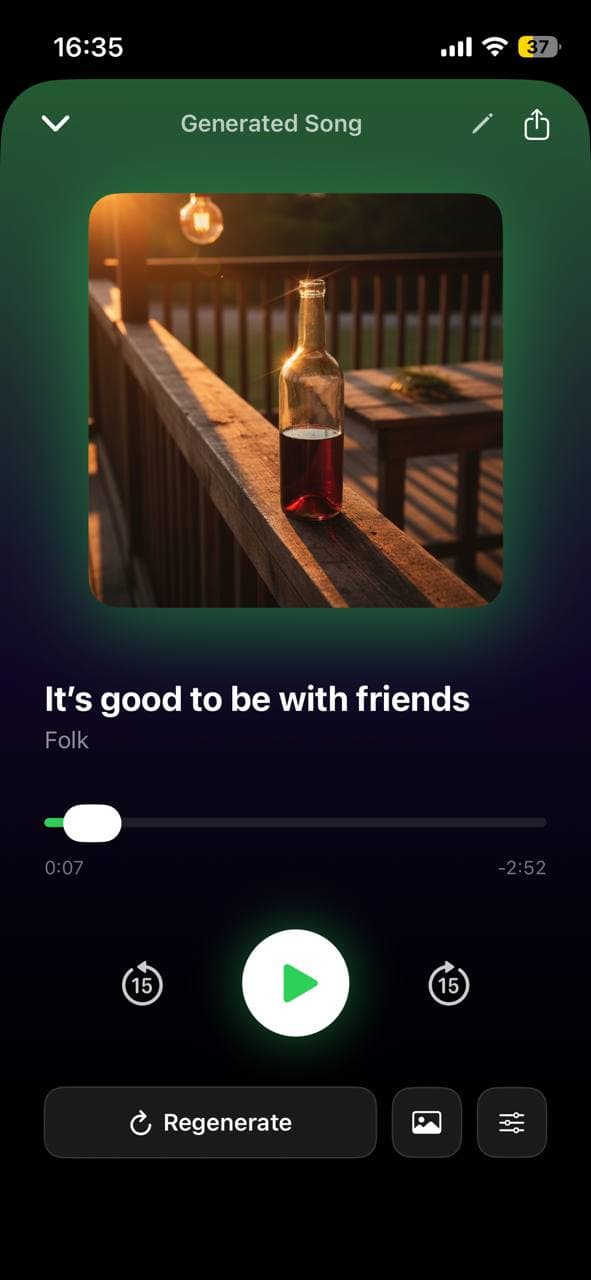
Most AI cover-art tools take a blank prompt. Larka does this differently: when you generate cover art for a song, it reads the song's *actual* lyrics and detected mood, and uses them as part of the prompt.
The practical effect: covers tend to be specific to the song's content rather than to the genre. A song with a recurring "rain on the window" image gets a cover that reflects that. A song about leaving a small town gets a road-and-horizon shot, not a generic guitar-and-microphone composition.
If you're using a tool that takes blank prompts, you can manually do this: extract two or three concrete images from your lyric and put them in the prompt.
Generating multiple variants and picking the right one
Always generate three or more variants per prompt. AI cover art has high variance — the same prompt produces wildly different images run-to-run. Pick the strongest after seeing several.
When evaluating:
- Squint. Does the composition still read?
- Look at it next to other songs in your potential playlist. Does it stand out or blend?
- Imagine it as your Instagram profile or your TikTok thumbnail.
The right one usually announces itself. If none of the variants feel right, change the prompt — don't keep regenerating. Variation only goes so far when the underlying prompt is wrong.
Common AI cover-art mistakes
AI-generated text. It will be garbled. Always specify "no text, no typography, no letters" in the prompt.
Faces close to camera. AI faces still drift into uncanny territory at thumbnail scale. Distance helps; backs of heads are safer than fronts.
Brand logos and trademarks. Most generators won't render them, but a few slip through. Keep them out.
"Album cover" in the prompt. Triggers stock-art tropes. Describe the *scene*, not the *medium*.
Generating at 1024 and upscaling. Generate at 2048 or higher when possible. Upscalers smooth detail; native-resolution generation preserves it.
From cover to release: embedding artwork in the MP3
Once you have your cover, embed it in the audio file's metadata before uploading anywhere. Most distribution platforms read embedded artwork; some require it; all of them benefit from it.
In Larka this happens automatically — when you share or export a generated song, the cover is embedded in the MP3's ID3 tag. In other tools you may need to do this manually with a tag editor (Mp3tag on desktop is the standard).
Embedded art means your cover travels with the file: AirDropped, emailed, or uploaded, the artwork stays attached. Worth doing every time.
Be first to try Larka AI
Larka launches on iPhone and iPad soon. Join the waitlist for an early-access link the moment it's live.
Join the waitlist →