Cover a Song With AI: How to Restyle a Track Without Losing What Made It Good
AI can restyle any song — folk to synthwave, acoustic to country, demo to produced. Here's how to do it without losing the soul of the original.
You have a song. Maybe it's your demo. Maybe it's an existing track you love. You wonder what it would sound like in a completely different style — your acoustic ballad as a synthwave anthem, your country song as lo-fi hip-hop, your bedroom demo as a stadium-ready production.
In 2026, you can find out in 90 seconds. AI cover/restyle tools take audio in, return audio out — same melody, same structure, completely different production. This is a guide to doing it well, not just doing it.
What "AI cover" actually means in 2026
Two distinct tools share the name:
Voice cloning covers — take a vocal performance and re-perform it in another singer's voice. Legally fraught (most platforms ban identifiable artist clones); ethically grey; technically possible. Not what this post is about.
Style transfer covers — take a finished song's audio and regenerate it in a different musical style. The melody and structure survive; the production transforms. This is the workflow worth learning.
Larka's Cover a Song feature does the second kind. So do Suno's "remix from audio" features and Udio's similar tools.
When to restyle (and when to leave a song alone)
Restyle when: your song is great but in the wrong genre for the moment, the demo doesn't sound finished, you want to test if the song works in a different context, you're making a remix for content/social, you're learning what your song is "really" about by hearing it in different clothes.
Don't restyle when: the production *is* the song (a lo-fi bedroom recording's intimacy disappears when you make it stadium-ready), the original has a specific cultural meaning the restyle erases, you're using the restyle to avoid the harder work of finishing the original.
The 4-step restyle flow
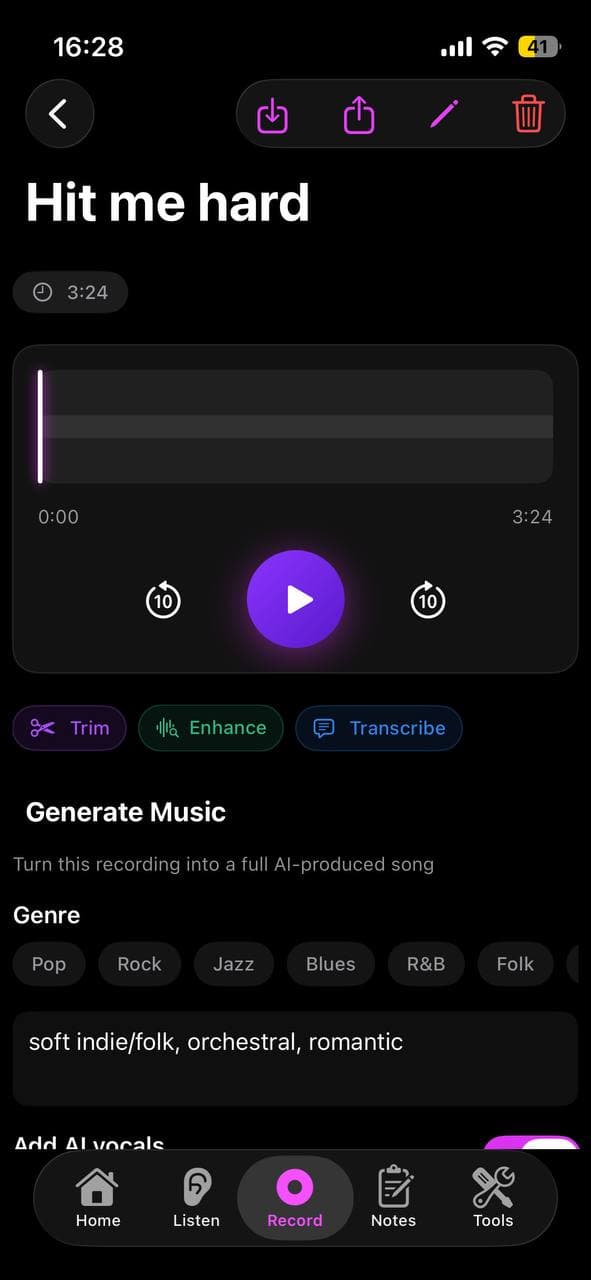
1. Pick the source. Tap Cover a Song in Larka. Upload an MP3, M4A, or WAV — your demo, an old recording, anything you have rights to.
2. Choose the new style. Genre + mood. Be specific: not just "rock" but "90s alt-rock" or "modern indie rock with cleaner production."
3. Generate. 60-90 seconds. The AI extracts the melody, harmony, and structure from your source, then re-performs it in the chosen style with new arrangement, instruments, and vocals.
4. Compare. Listen to the original and the restyle back to back. The melody should be recognizable. The instruments should be entirely different.
What survives the restyle and what doesn't
Survives: the melodic skeleton, the chord progression, the song structure (verse/chorus arrangement), the lyric content if vocals were present.
Changes: instruments, production density, tempo (sometimes), groove, vocal performance, mix balance, energy curve.
Sometimes lost: subtle vocal inflections that defined the original, intentional production roughness, very specific instrumental moments (a particular guitar lick, a specific drum fill).
This is why restyles work better for *demos* than for *finished* songs. A demo is melodic raw material; a finished song is the sum of a thousand intentional production choices, most of which the restyle will overwrite.
Restyle pairings that actually work
Some style transitions land more reliably than others:
Acoustic singer-songwriter → indie pop with electronic textures. Adds production scale; melody survives intact.
Bedroom demo → polished radio production. The "finishing" use case. Works well when the original has clear chords and melody.
Folk → synthwave. Counterintuitive but striking — folk melodies sit beautifully on analog synth pads.
Pop → orchestral cinematic. Strips away the dancefloor and reveals the emotional architecture.
Country → R&B / soul. The storytelling stays; the rhythm shifts. Often a revelation.
Pairings that struggle: anything → metal (the AI vocal models still aren't great at scream/growl), highly genre-specific dance music → another dance subgenre (the energy doesn't translate cleanly).
How to use restyles for demos
If you're a songwriter with a folder of voice-memo demos, restyling is a way to hear which ones have legs.
Workflow: pick five demos. Restyle each in the same style (say, indie pop with female lead vocal). Listen back to back. The two or three that *come alive* in the restyle are the songs worth developing further. The ones that still sound like rough demos may not be the strongest material.
This is genuinely useful for sorting through a backlog. The restyle reveals which songs have melodic hooks strong enough to survive any production decision.
Legal and ethical guardrails
Restyling your own songs: completely fine, no legal questions. You wrote it.
Restyling someone else's song you have rights to (e.g., you co-wrote it, you have a license): also fine.
Restyling a copyrighted song you don't have rights to: generates an unauthorized derivative work. You can do it for personal listening; you can't release or monetize it.
Restyling to mimic a specific artist's voice: voice cloning of identifiable artists is increasingly banned by tools and platforms. Don't do this even if you can.
Releasing a restyled version of your own song: distribute through DistroKid, TuneCore, or similar — most modern AI tools (including Larka on paid tiers) grant full commercial release rights.
The deeper use: figuring out what your song is
Past the practical workflow, there's a creative use most people miss.
If you're not sure whether your song is "really" a folk song or a pop song — restyle it both ways and listen. The version that *feels right* tells you something about the song's essential identity, separate from your initial production instincts.
Many songwriters make production decisions out of habit (you only know how to make folk-style demos, so every song becomes a folk demo). Restyling is a way to escape your defaults and discover what each song actually wants to be.
That's worth more than any single restyle.
Be first to try Larka AI
Larka launches on iPhone and iPad soon. Join the waitlist for an early-access link the moment it's live.
Join the waitlist →