How to Find the Chords of Any Song You're Listening To
Real-time chord detection on iPhone: how to figure out what chords are playing in any song — by ear, by app, or by AI.
"What chord is that" is one of the hardest questions in music. It's why chord books exist. It's why every guitarist owes someone an hour for figuring out a song they couldn't crack.
The good news: in 2026 your phone can answer the question in real time. The slightly more complicated news: the answer depends on whether the song is recorded, playing live, in your room, or in your head. Here's how to handle each case.
Why "what chord is that" is the hardest question in music
Identifying a chord by ear requires hearing several pitches at once and inferring their relationship. Trained musicians do this fluently; most people don't. Worse, the same chord can sound dramatically different depending on voicing, instrument, and the chords around it.
The practical takeaway: don't beat yourself up if your ear isn't there yet. Ear training takes years. Apps can answer the question in seconds while you keep practicing.
The three approaches: by ear, transcribe-then-look-up, and live detection
By ear — listen, hum the bass note, find it on a piano, then guess the chord quality (major/minor) by feel. Slow but free, builds your ear.
Transcribe-then-look-up — find a tab or chord chart on the internet (Ultimate Guitar, Chordify, etc.). Fast for popular songs, useless for anything obscure or live.
Live detection — point a chord-detecting app at the audio (a song playing, an instrument playing) and let it identify the chord in real time. Fast, works for anything audible, no transcription needed.
Using a real-time chord detector while a song plays out loud
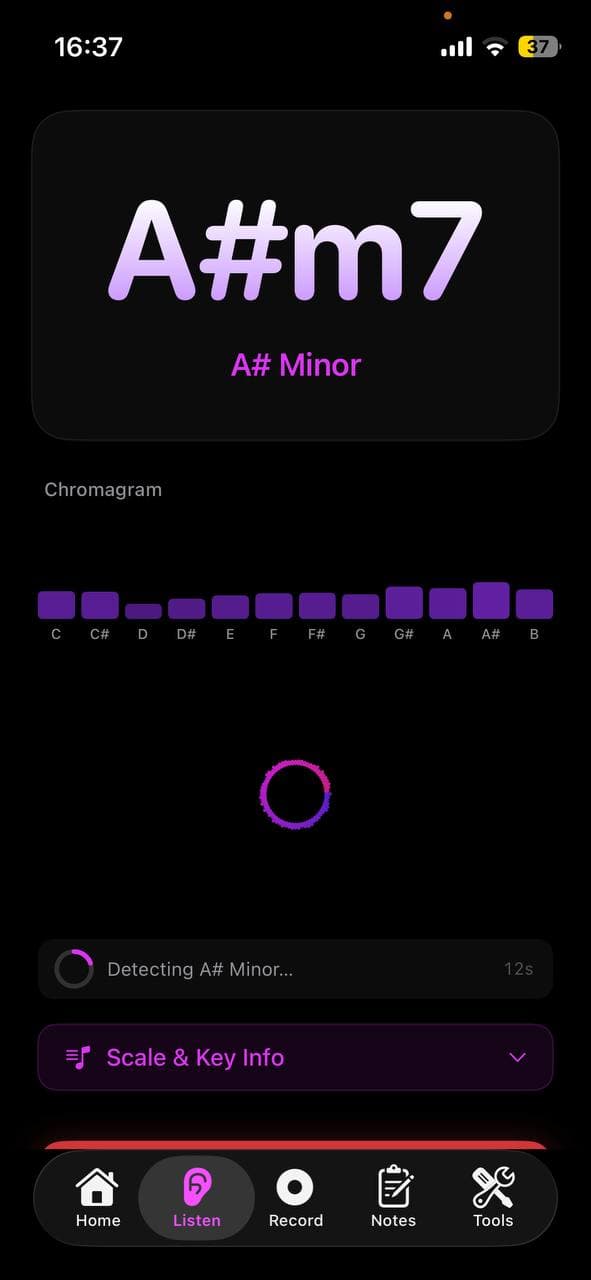
Open Larka and tap Listen Mode. Hold your phone toward the speaker. Within a few seconds you'll see the current chord, the song's detected key, and a live timeline of chord changes as they happen.
This works for music playing on:
- Bluetooth speakers
- Laptop speakers
- Another phone
- Live performance (a friend playing acoustic guitar, a band on stage)
For headphone audio (music playing only in your AirPods), you'll need to play it out loud or use the built-in iPhone screen-recording mic to route playback through the analyzer.
Reading a chord timeline after a recording
If you'd rather record first and analyze after, use the Record tab. Hit record while the song plays (or while you play your instrument). Stop recording when done. Larka analyzes the audio and shows you a full chord timeline with timestamps — you can scrub through and see exactly when each chord changes.
This is the right tool when:
- The song is too long to watch in real time
- You want to send the chord sheet to someone
- You want to learn the song and need to study the changes
- The audio is noisy and live detection struggles
Recorded analysis tends to be more accurate than live detection because the algorithm has the whole audio to compare against.
Limits of automatic detection (and how to fix them)
Detection is good but not perfect. Common failure modes:
Dense mixes. Heavy production with thick instrumentation can mask the harmonic content. Try analyzing during a quieter section.
Distorted guitar. Heavily overdriven power chords sometimes detect as ambiguous. Live detection struggles more than recorded analysis here.
Solo instruments without harmony. A vocal melody alone has no chord — the algorithm guesses the implied chord, which may be wrong. Detect the chords from the harmonic instrument, not the vocal.
Modulations. Songs that change key mid-song will report different keys depending on what was playing during analysis. Both can be right.
When detection feels wrong: try recording instead of live mode, listen during the simplest section of the song (verse, intro), and trust the chord that repeats more than the chord that flashes for a beat.
From detected chord to "I can play it"
Once Larka identifies a chord, tap it to see the diagram. Larka has diagrams for ~45 common guitar chords with finger positions, including alternate voicings.
If you don't play guitar, the chord name still tells you what notes to find on whatever instrument you do play. C major = C, E, G. A minor = A, C, E. The notes are universal; the diagram is instrument-specific.
Building a chord chart for a band rehearsal
Recording a song and getting back a chord timeline is essentially a free chord chart. Export the analysis (Larka exports chord progressions as MIDI for use in a DAW, or you can screenshot the timeline). Send it to your bandmates before practice.
This is a common workflow for cover bands and church musicians: someone plays the song into Larka, the analyzed chord chart goes in the rehearsal folder, the band shows up knowing the changes.
Apps compared
Chord AI — pioneer of mobile chord detection. Strong recorded-file analysis. iOS and Android.
Chordify — large catalog of pre-analyzed popular songs. Best when the song you want is already in their library; weaker for anything obscure.
Moises — known for stem separation; chord detection is solid as a side feature.
Larka — real-time live chord detection plus analyzed recordings, all combined with the rest of the songwriting toolkit (key, BPM, MIDI export, chord diagrams). Best when you want chord detection as part of a broader creative flow rather than as a standalone utility.
For pure "what chord is this" use, all four work. Pick based on what else you need the app to do.
Be first to try Larka AI
Larka launches on iPhone and iPad soon. Join the waitlist for an early-access link the moment it's live.
Join the waitlist →