How to Find the Key of Any Song Using Your iPhone
Three ways to find the key of any song on iPhone — by ear, with a key-finder app, and in real time using live chord detection.
If you want to play along with a song, write in the same key, sample it, transpose it, sing it in a comfortable range, or jam over it — you need its key.
Finding the key used to require musical training. Now you can do it on a phone in fifteen seconds. This post is the practical guide: three methods, when to use each, and what makes detection accurate.
Why knowing the key matters
Jamming — to play along with a song, you need to know which scale notes will fit. Every key has a set of "in" notes; everything else clashes.
Covering — singing in someone else's key may not match your vocal range. Knowing the original key lets you transpose to one that fits you.
Writing in the same vibe — songs in the same key tend to feel related. If you wrote a track that sits well next to a reference song, write in that song's key.
Sampling — when chopping or layering audio, samples in the same (or related) keys blend; samples in clashing keys fight.
Method 1: by ear (and why most people fail at this)
Theoretically, the key is whichever note feels like "home" — the note the song wants to resolve to. Listen, hum the note that feels final, find that note on a piano. That's the tonic.
This works for trained ears and almost no one else. For the rest of us, the home note shifts in real time as the song moves through different chords, and "feels final" is an unreliable signal. By-ear is a learn-it-slowly method. For now, use one of the next two.
Method 2: dedicated key-finder apps
Apps like Auto-Key, Tunebat, and Song Key Finder are built for this. You either play a song's audio file into them or upload the file. They run a key-detection algorithm and return a result.
This works well for finished, recorded songs — anything you already have a file for. It does *not* help if the song you're trying to figure out is playing on a friend's speaker, on the radio, or being performed live in front of you.
Method 3: real-time detection while playing or listening
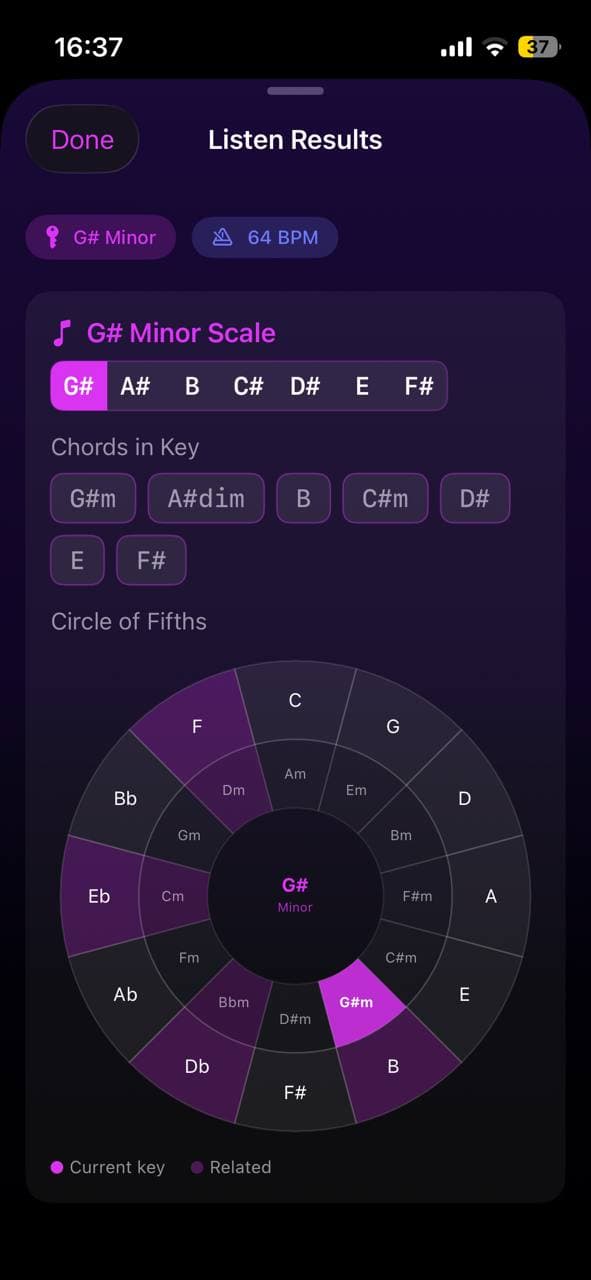
Open Larka and tap Listen Mode. Hold your phone toward the speaker (or play your instrument into the mic). Within a few seconds, Larka shows the detected key, scale, and current chord — updating live as the song plays.
This is the fastest method for "what key is this song I'm hearing right now." Works for live music, recorded music, your own playing, or a video playing in the next tab.
The accuracy depends on how clearly the harmonic content can be picked up — clean recordings and solo instruments work best, dense mixes and noisy environments work worst.
What makes detection accurate (and what breaks it)
Helps accuracy: clear audio, harmonic instruments (piano, guitar) prominent, longer listening time, songs that stay in one key.
Hurts accuracy: background noise, percussion-only sections (no harmonic content to read), heavy distortion that masks pitch, songs that modulate (change keys mid-song), very ambient music with no clear tonal center.
If two apps disagree, the more confident one is usually right — but listen for modulations. A song in C that switches to Eb for the chorus will give different keys depending on which section you analyzed.
Once you have the key: scales, chords, related keys
Knowing the key unlocks a chain of useful information.
Scale: the seven notes that "belong" in this key. In C major, they're C-D-E-F-G-A-B. Anything you play from these notes will sound consonant.
Diatonic chords: the chords built from those scale notes. In C major: C, Dm, Em, F, G, Am, Bdim. These are the chords most songs in C will use.
Related keys (Circle of Fifths): C major's "neighbors" are G major (one sharp) and F major (one flat), plus the relative minor (A minor). Modulating to a neighbor sounds smooth; jumping across the circle sounds jarring (which can be the point).
Larka's Circle of Fifths screen shows all of this at a glance.
Recording yourself jamming so the analysis is automatic
If you're practicing or improvising and want to know what key you ended up in, just record. The Record tab in Larka analyzes every recording for key, scale, BPM, and chord progression the moment you stop. No need to switch apps or run a separate detection step — your recording's key is part of its metadata.
This is especially useful for songwriters who tend to wander into a key during a jam without knowing it. Record the jam, look at the metadata, write down the key.
FAQs
Minor vs. major. Same set of notes can be either, depending on which note is the tonic. C major and A minor share the same scale but have different "homes." Detection apps look at chord emphasis to decide.
Modulations. Many songs change key. If you analyze the verse you might get one answer; the chorus might give another. Both can be right. List both.
Why two apps disagree. Different algorithms weigh chord prominence vs. melodic emphasis differently. If apps disagree, the song is ambiguous — usually a sign of borrowed chords or a non-standard tonal center. Trust the one that listens longer.
Be first to try Larka AI
Larka launches on iPhone and iPad soon. Join the waitlist for an early-access link the moment it's live.
Join the waitlist →