Sing an AI Song in Your Own Voice — From Your iPhone
Clone your real singing voice once and have the AI sing every future song in your actual voice. A 2-recording setup that takes 90 seconds.
Until very recently, "use your own voice with AI music" meant one of two things. Either you were a famous artist with a licensed voice deal, or you were spending two hours per song stitching a recorded vocal take into an AI-generated instrumental in a DAW — fighting timing, key, and the model's tendency to ignore the parts you cared about.
In May 2026 that changed. The upstream voice-cloning API that powers Larka stopped requiring desktop-only verification and shipped a phone-friendly path: record a short sample of your voice, prove it's yours by reading a verification phrase, and you get a reusable Voice ID. From then on, every song you generate — Notes, Hum-to-Song, Cover, Extend — can sing in *your actual voice*.
This is a guide to the 90-second setup, and what the workflow actually looks like once your voice is saved.
The 4-step setup
Open Larka. On the home screen there's a new card: Set Up Your Voice.
Step 1 — Record your voice. Sing or talk for 15–30 seconds into the phone. Quiet room, mic close to your mouth, just your voice — no background music. The AI uses this clip to learn your timbre.
Step 2 — Get a verification phrase. Larka uploads your recording and asks the AI for a unique phrase, something like *"Harmonies fill the air with joyful melodies tonight."* This usually takes 20–40 seconds.
Step 3 — Read the phrase aloud. Tap record again and read the phrase clearly, in a similar tone to your first recording. This proves the voice belongs to you (the AI cross-checks the two recordings).
Step 4 — Name your voice. "My Voice", "Stage Voice", "Falsetto" — whatever you want to call it. Tap Create. About 30–60 seconds later, your voice is saved.
That's it. The home-screen card disappears, and your voice is now in the picker on every generation screen.
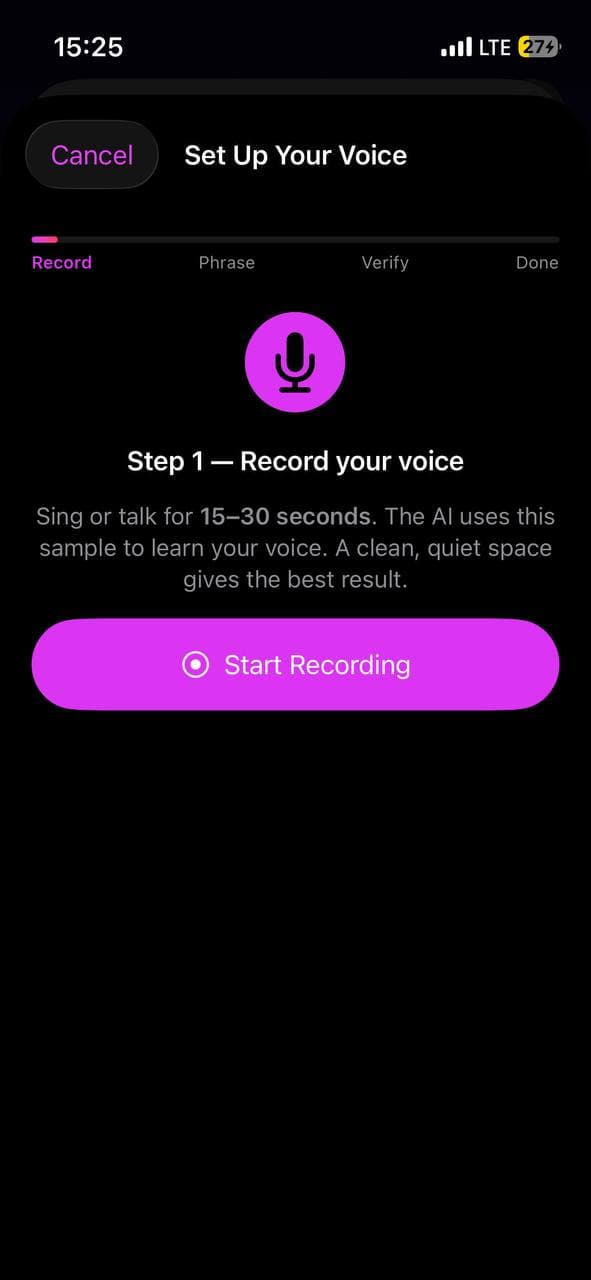
Why the verification phrase exists
Voice cloning that lets you upload "any voice you can find on YouTube" is a legal and ethical disaster. The verification phrase is an anti-impersonation safeguard: it confirms the voice you're cloning is yours. The AI matches what you said in step 1 against what you read in step 3 — if they don't sound like the same person, verification fails and the voice never gets created.
This means you can't clone a celebrity, an ex, or your favorite singer. Only your own voice. That's by design and we're not interested in breaking it.
If verification fails the first time (background noise, weird mic angle, wrong tone), just tap "Get a different phrase" and try again. The AI will mint a fresh phrase tied to your original recording, so you don't have to redo step 1.
Using your voice in a song
Once your voice is saved, generating a song with it is the same as any other generation, plus one extra tap:
1. Open Notes (or Record → Hum to Song, or any generation surface).
2. Set your lyrics, genre, mood, key as usual.
3. Tap the Voice picker — your cloned voice appears with a 🎤 mic icon, alongside the existing stylistic options (Female Soft, Male Raspy, etc.).
4. Tap your voice → tap Generate Music.
The AI generates the song with your voice singing the lyrics. ~30–90 seconds per song.
Your voice works across every generation path:
- Notes → Generate Music (write lyrics, get a song with your vocals)
- Record → Hum to Song (hum a melody, the AI sings *your* voice over it)
- Recording → Generate Music (cover a real recording in your own voice)
- Extend a track (extension keeps your voice across the longer version)
What it sounds like (honest expectations)
Voice cloning in 2026 captures vibe and timbre more than perfect identity. It will sound like you in the same way an impressionist sounds like a celebrity — clearly *of you*, recognizable, but not a forensic match. The cleaner and longer your source recording, the closer the clone gets.
Tips to maximize fidelity:
- ·Sample yourself singing, not talking. If your verification recording is speech, the AI learns a speaking timbre and has to extrapolate to a singing one. Re-record while singing a melody.
- ·Match the style to your target songs. If you set up your voice over a soft ballad and then ask the AI to belt out rock, fidelity drops. Setup in a similar register to what you'll generate.
- ·Cover your full pitch range. Sing low and high notes during setup so the model has reference for both.
- ·Cleanest possible audio. Quiet room, phone mic 6 inches from your mouth, no instrument playing under you.
If your first voice doesn't sound right, you can always create another one in Settings → Your Voices → Add Voice. Many users end up with two or three (e.g. "Talking Voice", "Singing Voice", "Falsetto") and pick the right one for each song.
Managing your voices
Settings → Your Voices lists every voice you've cloned. Each row shows a small status dot:
- ·🟢 Green — active and usable
- ·🔴 Red — needs re-verification (cloned voices have a limited validity window upstream)
- ·⚪️ Gray — checking
Tap a row to open a menu: Rename or Delete. Delete shows a confirmation alert (it only removes the local entry — the upstream clone is unaffected).
When a voice goes red, Larka prompts you to read a new verification phrase the next time you try to use it. You don't have to re-record your original voice sample — just read the new phrase, and you're back in business.
A worked example
Tuesday morning. You wrote a verse on the bus that you've been humming all day. You open Notes, type the four lines, pick "Indie · acoustic · melancholy", and hit Voice → My Voice. Tap Generate Music. Sixty seconds later you have a song. It's your voice singing lyrics you wrote on a bus, over a fingerpicked acoustic instrumental the AI built around them.
You tap Generate Music Video. Ninety seconds later you have an MP4 with synchronized lyrics. Tap Share → TikTok. Caption: "Wrote this on the bus."
The people who watch it won't be able to tell you didn't record the vocal yourself in a studio. That's the change.
The deeper point
For most of recorded-music history, "sing in your own voice on a song you wrote" required either being a trained singer with studio access or settling for what your bedroom-recorded voice memo sounded like.
Now it's a phone setting. The vocal is *yours* — recognizably you — and the song around it is fully produced. The bottleneck moves from "can you record a passable vocal take" back to where it should have always been: "did you write a song people want to listen to."
The technology stopped being the gatekeeper. The voice the AI sings in is no longer some generic AI character — it's the one you've been hearing in your own head all along.
Be first to try Larka AI
Larka launches on iPhone and iPad soon. Join the waitlist for an early-access link the moment it's live.
Join the waitlist →