Split an AI Song Into Vocal + Instrumental Stems on Your iPhone
Separate any generated song into a clean vocal track and an instrumental track. Mix, mute, solo, and share each stem — all on the phone.
Stems — the separate vocal track and instrumental track of a song — used to be the kind of thing only producers cared about. You needed them to make a karaoke version. You needed them to remix. You needed them to practice singing over the instrumental. You needed them to drop a vocal line into another song.
For decades, getting stems out of a finished song required source files from the original sessions. Source files you almost never had access to.
For AI-generated songs in 2026, this is now a one-tap operation. Open the song, tap Separate Stems, wait about a minute, and you have a vocal stem and an instrumental stem you can mix and share independently. Here's how it works in Larka.
Enabling stem separation
Stem Separation is in Beta and off by default. To turn it on:
Settings → Beta Features → Stem Separation toggle
Once enabled, every saved AI-generated track in your library picks up a new menu action. The feature is free during Beta — adds about $0.05 of upstream cost per song separated against our budget.
Splitting a song
Open any recording with a saved AI-generated track. In Saved Tracks, tap the ⋯ (three-dot menu) on the track you want to separate. The menu shows a new entry: Separate Stems.
Tap it. The menu icon turns into a small spinner. The AI starts splitting the song server-side. Typical processing time: 1–4 minutes depending on the song length and how busy the upstream service is.
You can keep using the app — separation runs in the background. When it's done, you'll get a phone notification: "Stems ready 🎚 — Tap to mix the vocal and instrumental tracks." Tap the notification and the Stem Mixer opens directly to that song.
If you're already in the app when separation finishes, you get an in-app alert instead with a Mix Now button.
Using the mixer
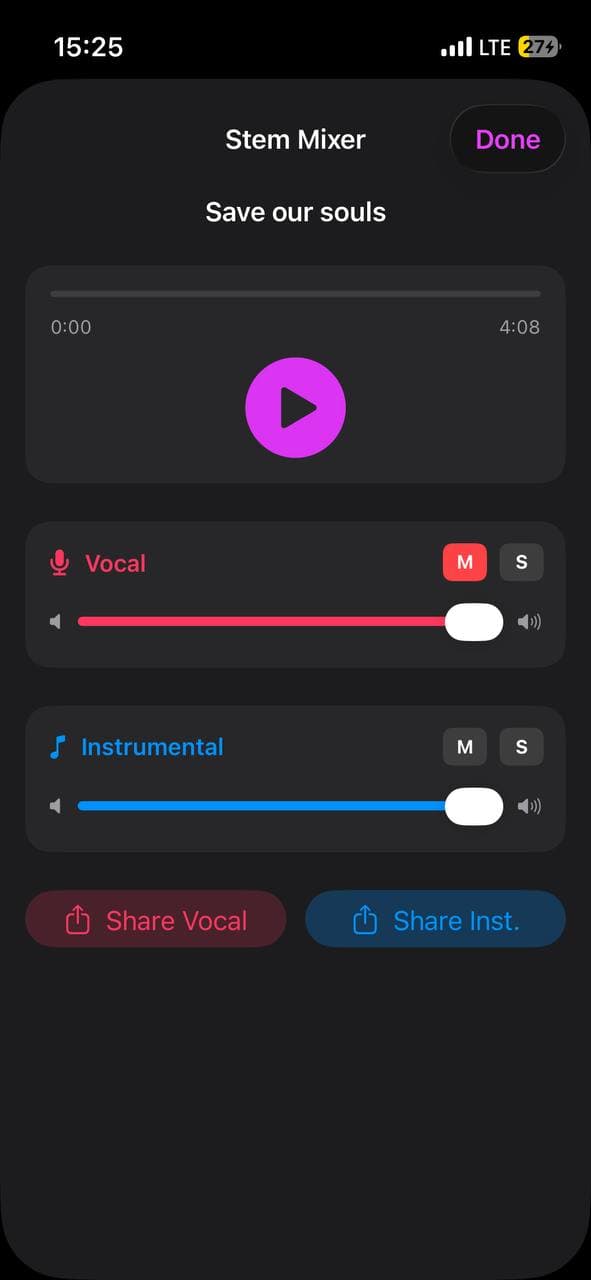
The Stem Mixer is a focused, two-channel view — no plugin chains, no buses, no automation. Just the two stems with the controls that actually matter:
Vocal channel (pink): volume slider, M (mute), S (solo).
Instrumental channel (blue): same controls.
A single play button at the top plays both stems in perfect sync. Drag the scrubber to seek anywhere in the track — both stems jump together, sample-accurate.
Four useful one-tap modes:
- ·Karaoke — mute the vocal, sing along live
- ·Vocal-only — solo the vocal to hear just the AI's sung performance
- ·Instrumental-only — solo the instrumental for backing-track use
- ·Custom mix — slide either channel up or down to rebalance how the vocal sits in the mix
Sharing stems
Below the mixer are two share buttons: Share Vocal and Share Inst.
Each opens the iOS share sheet with the corresponding MP3 file. From there you can:
- ·AirDrop the file to your Mac (for a DAW import)
- ·Save to Files
- ·Send via Messages, WhatsApp, email
- ·Attach to a Google Drive upload
- ·Open in any audio app that accepts MP3
The stems are the same audio quality the AI generated. Vocal stem is just the singing on a transparent musical bed; instrumental stem is the music with the vocal removed.
Note: there's no "export custom mix" in v1 — you can share each stem individually but not a single merged file with your slider settings baked in. Easy v2 addition if there's demand.
A worked example
You've made a song you love — full vocals, instrumental, the works. You want to post a TikTok where you actually sing the chorus over the instrumental yourself.
1. Open the recording in Larka → tap ⋯ on the track → Separate Stems.
2. Wait for the notification (~90s).
3. Tap the notification → mixer opens.
4. Tap Share Inst. → Save to Files (or AirDrop to Mac).
5. Open your video app of choice, drop the instrumental in, record yourself singing over it.
The AI did the production. You did the chorus. The whole loop from "I want to do this" to "uploaded video" is maybe 6 minutes.
Honest limits
One-time op per track. The split is computed once and cached locally. If you don't like the result, you can re-run it (re-runs the upstream cost). Most songs come out clean on the first try.
Some bleed is normal. Source separation isn't perfect. On songs with heavy reverb on the vocal or vocals processed through unusual effects, you may hear a touch of vocal in the instrumental or vice versa. The cleaner the production style, the cleaner the split.
Quality matches the source. If the original generation is muddy, the stems will be too. Garbage in, garbage out.
No 4-stem split yet. Currently we ship the simpler 2-stem mode (vocal + everything else). Splitting into drums / bass / vocals / other separately is supported by the upstream API and may land in a later update if there's interest.
The deeper point
Stems used to be the dividing line between "music you consumed" and "music you could remix." That line is dissolving in 2026 — not because the technology became more powerful, but because the cost of separation collapsed.
When splitting a song into stems takes 90 seconds and costs five cents, the assumption changes. Every track is remixable. Every vocal is portable. Every instrumental is a karaoke version of itself. The phone in your pocket is now both a music creation tool *and* a stem-extraction studio.
What you do with that is up to you. But the technical excuse — "I'd love to do that, but I don't have the stems" — is gone.
Be first to try Larka AI
Larka launches on iPhone and iPad soon. Join the waitlist for an early-access link the moment it's live.
Join the waitlist →