Hum to Song
Hum a melody and Larka turns it into a full AI-generated song — with optional AI-sung lyrics — powered by our AI engine.
Hum to Song takes a melody you sang or hummed and generates a complete produced track around it. The AI keeps your actual melody and key as the foundation — it doesn't invent a new tune, it arranges yours. You pick the genre, mood, and (optionally) lyrics, and Larka composes the rest.
How to use it
- Open the Record tab and tap the record button.
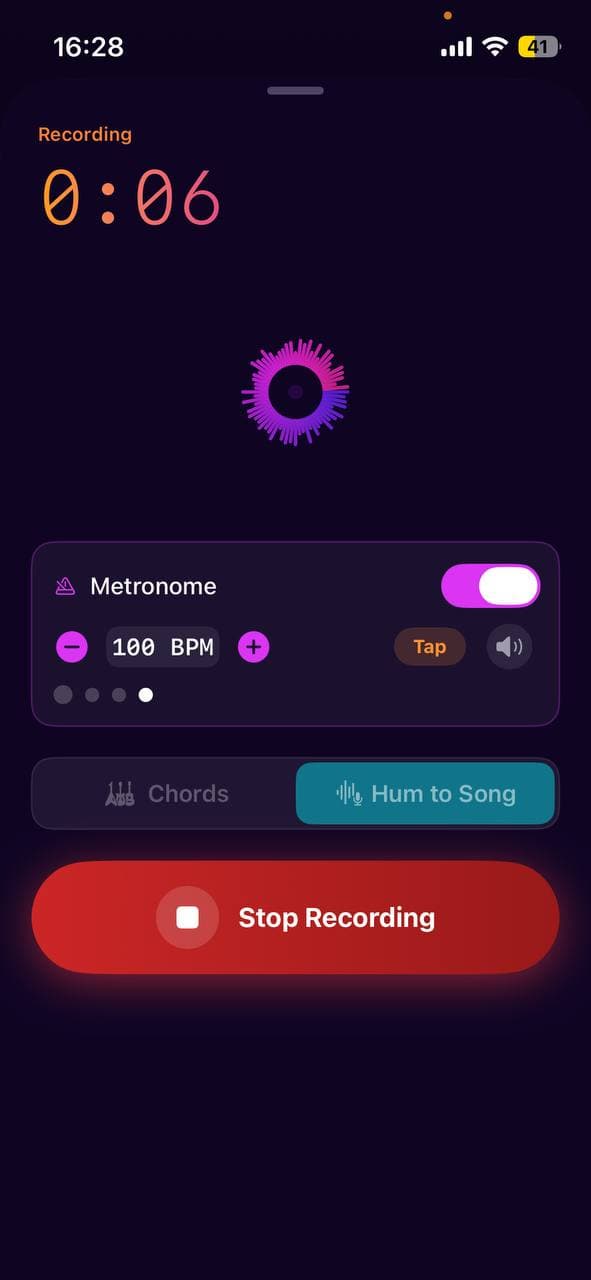
- In the recording sheet, switch the mode at the top to Hum to Song.
- Tap Start Recording and hum, whistle, or sing your melody (up to 30 seconds).
- Tap Stop. Larka auto-saves your hum to the Library and analyzes it to detect key, scale, tempo, and notes — so even if you close the flow, your hum is safe.
- On the Style screen, pick a genre, optionally describe the mood, and choose an arrangement (full band, acoustic, electronic, lo-fi, cinematic).
- Decide whether to Add AI vocals (on by default). If on, a lyrics editor appears — type your own words or tap Auto-write to have AI draft 4–6 lines that fit the genre/mood/key.
- Choose Song (one ~2-minute track) or Full Song (automatically extends to ~3+ minutes after the initial generation).
- Tap Generate Song. Generation takes 30–90 seconds for Song, 60–150 seconds for Full Song. You can leave the app — a local notification pings you when it's ready.
- Listen to the result, pick from 3 AI-generated cover art variants, regenerate if you want a different take, or tap Extend further to chain more audio. Save to Library when you're happy.
Auto-saved hum
The moment you open the Hum to Song flow, your raw recording is copied into the Library as a melody recording. You can close the flow at any time without losing the hum — it's already saved. When you later tap Save to Library after generating, the finished song is attached to that same recording rather than creating a duplicate. Recordings with one or more generated songs get a bright ♪ Song pill on their row in the library so you can spot them at a glance.
Clean up melody (optional)
With Clean up melody enabled, Larka snaps your hummed pitches to the detected scale and the timing to a beat grid, then re-renders a clean synth version you can A/B preview against the raw hum (Raw hum / Cleaned buttons under the piano roll). Our AI engine handles wobbly hums fine either way, so this toggle is mostly for your own reference — pick whichever sounds better to you.
Add AI vocals with lyrics
When the Add AI vocals toggle is on, the lyrics editor appears. You have three options:
- ·Type your own lyrics. Our AI engine supports structural tags inline — write `[Verse]`, `[Chorus]`, `[Bridge]`, `[Pre-Chorus]`, `[Outro]`, or even `[Spoken Word]` on their own line to tell our AI engine how to structure the song.
- ·Tap Auto-write. Larka uses Gemini to draft 4–6 lines that fit your chosen genre, mood, and key. The result is written into the editor for you to edit or regenerate.
- ·Leave it blank. Our AI engine treats your hum itself as the vocal track and adds arrangement around it — no new words, just your voice styled into a song.
Extend to a full song
After generating, the Result view shows an Extend to full song button. Tapping it continues the track — every extend adds roughly another minute. You can chain extends indefinitely; the button label updates ("Extend further +2") so you know how many times you've chained. Extend is separate from the Song/Full Song toggle: the toggle pre-runs one extend automatically, the button lets you keep going beyond that.
Steer the continuation (optional). Above the button there's a "How should it continue?" field plus quick chips — Add chorus, Build up, Add bridge, Calm outro, Instrumental break. Type your own direction or tap chips (they stack), and the AI follows that intent for the next section instead of just guessing. Leave it blank to keep the classic "just continue" behaviour.
Extend from a specific point (optional). Flip on "Extend from a specific point" to reveal a slider and choose where in the track the new section grows from — handy for reworking the last part instead of only tacking onto the very end. Off by default = extend from the end.
Your steering choices apply to that one extend and reset afterwards, so each "Extend further" starts fresh.
Regenerate vs Try Different Style
Both sit on the Result screen:
- ·Regenerate — re-runs with the exact same settings, giving you an alternative take without changing anything.
- ·Try Different Style — goes back to the Style screen so you can change genre, mood, lyrics, or any other setting before generating again.
How many songs you can make
There's no daily cap — you can generate as many songs as your free allowance permits. During the beta that's 25 per account (Generate and Extend both count toward it). When you run out, you'll be prompted to upgrade.
What happens under the hood
Your hum is uploaded to our AI engine's V5 model through its upload-cover pipeline, along with a prompt built from your genre, mood, key, and optional lyrics. If lyrics are provided, Our AI engine switches to "custom mode" and sings those exact words over your melody. If not, it covers the hum as an instrumental arrangement or lets your voice remain the vocal. Generation runs in the background with an iOS background task, so the network call survives switching apps.
Tips for best results
- ·Hum steadily and hold each note for at least half a second so pitch detection locks in.
- ·"Ooh" or "mmm" vowels give cleaner detection than consonant-heavy syllables.
- ·Record in a quiet room — background noise can confuse the key/note analysis.
- ·Slower, clearer melodies translate better than very fast runs.
- ·If our AI engine's lyric filter flags the AI-written words on Extend, Larka automatically retries as instrumental — you'll get a longer song, just without new vocals on the extended part.
Saving and sharing
Tap Save to Library. The generated MP3 is stored with proper ID3 metadata (title, artist "Larka AI", embedded cover artwork), so if you share it via AirDrop or the share sheet it shows up in Apple Music, Files, and other players as a real titled track with artwork — not a mysterious audio blob. Playback works on the lock screen and supports AirPlay.