Metronome
How to use the metronome, tap tempo, and haptic beat feedback.
Larka's metronome keeps perfect time and stays running while you record — so your recordings always have a locked BPM reference.
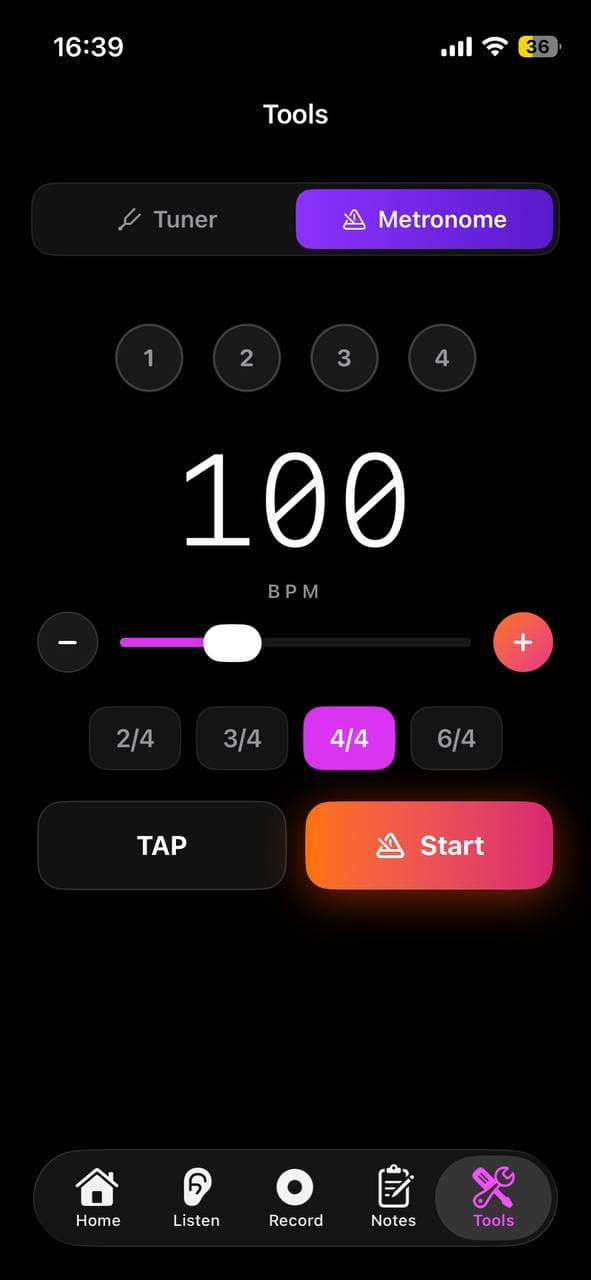
Setting the tempo
Go to the Tools tab and tap Metronome.
- ·Use the + / − buttons to adjust BPM one step at a time.
- ·Long-press for faster changes.
- ·Tap Tap Tempo repeatedly in time with your desired beat — Larka calculates the BPM from your taps automatically.
Subdivisions
Beyond the main pulse, the metronome can click on subdivisions of each beat so you can lock in tighter feels:
- ·Quarter — one click per beat (the default).
- ·8th notes — two clicks per beat.
- ·Triplets — three clicks per beat, for swing and shuffle feels.
- ·16th notes — four clicks per beat, for fast or busy passages.
Subdivision clicks are quieter than the main beat, so the pulse still stands out. Tap the subdivision selector above the tempo to switch.
Per-beat accents
Every beat in the bar is tappable. Tap a beat's dot to cycle its accent:
- ·Accent (loud) — the strong beats, like beat 1.
- ·Normal — a regular click.
- ·Muted (silent) — skip that beat entirely.
This lets you build custom patterns — accent the 2 and 4 for a backbeat feel, mute a beat to practice an off-kilter groove, or move the downbeat accent wherever you need it. Your accent pattern is remembered per time signature.
Haptic feedback
On supported iPhones, the metronome can pulse the Taptic Engine on every beat — so you feel the rhythm through the phone even when the sound is off or you're wearing headphones.
Enable it in the metronome settings. Accented beats have a stronger haptic feel than normal beats, and muted beats don't pulse.
Time signatures
Choose from common time signatures: 4/4, 3/4, 2/4, 6/8. By default beat 1 is accented, but you can move or add accents yourself using per-beat accents (above).
Recording with the metronome
Start the metronome first, then go to the Record tab. The metronome keeps running in the background while you record. When you stop, Larka uses the metronome's BPM as the recording's tempo — no guessing needed.