Stem Separation (Beta)
Split any generated song into vocal and instrumental tracks, then mix or share them individually.
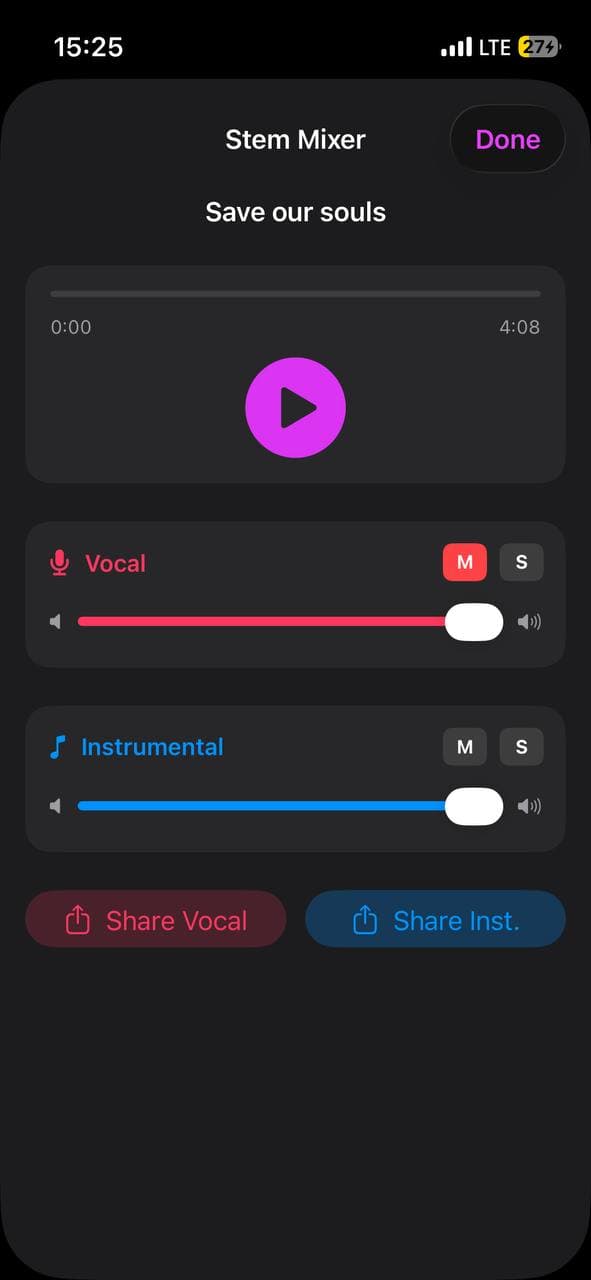
Stem Separation pulls a generated song apart into two synced tracks: a vocal stem (just the singing) and an instrumental stem (everything else). You can then mix the two with independent volume sliders, mute or solo a stem, or share each one as its own audio file. Useful for karaoke versions, instrumental backings, vocal practice, or pulling a vocal hook into another tool.
Enabling the feature
Stem Separation is in Beta and off by default. Turn it on in Settings → Beta Features → Stem Separation. Once enabled, every saved generated track gets a new menu action.
How to separate stems
- Open any recording with a saved generated track.
- Tap the ⋯ menu on the track row.
- Tap Separate Stems. The job runs in the background — you can keep using the app or close it.
- When the stems are ready (usually 1–4 minutes), you'll get a phone notification: "Stems ready 🎚 — Tap to mix the vocal and instrumental tracks."
- Tap the notification → the Stem Mixer opens directly to that song. Or if the app is already open, you'll get an in-app Stems ready alert with a Mix Now button.
- You can also open the mixer manually anytime: ⋯ menu → Mix Stems.
Using the mixer
Vocal / Instrumental sliders — control each stem's volume independently.
M (Mute) — silence one stem. Tap again to bring it back.
S (Solo) — when any solo is on, only soloed stems play. Useful for isolating just the vocal or just the music.
Scrubber — drag the progress bar to jump anywhere in the track. Both stems stay perfectly in sync.
Four useful one-tap modes:
- Karaoke — mute the vocal, sing along live
- Vocal-only — solo the vocal
- Instrumental-only — solo the instrumental
- Custom mix — adjust the slider balance
Sharing stems
Below the mixer you'll see Share Vocal and Share Inst. buttons. Each opens the iOS share sheet so you can send the stem to Files, AirDrop it, attach it to Messages, or hand it off to a DAW like GarageBand or Logic.
Stems are MP3 files at the same quality the original song was generated at.
Cost and limits
Each separation adds about $0.05 of upstream cost per song and counts against your daily generation cap. The split is computed once and cached — replaying or remixing later is free.
If you delete a generated track, its stems are deleted with it.
Very old tracks generated before our AI engine tracked their internal IDs can't be separated. If you don't see the Separate Stems action on a particular older song, regenerate it and try again.