AI Lyric Writer
How to use the AI Lyric Writer to generate, continue, or rewrite lyrics.
The AI Lyric Writer generates song lyrics based on your key, genre, mood, and any text you've already written. It's available inside every Songwriter Note.
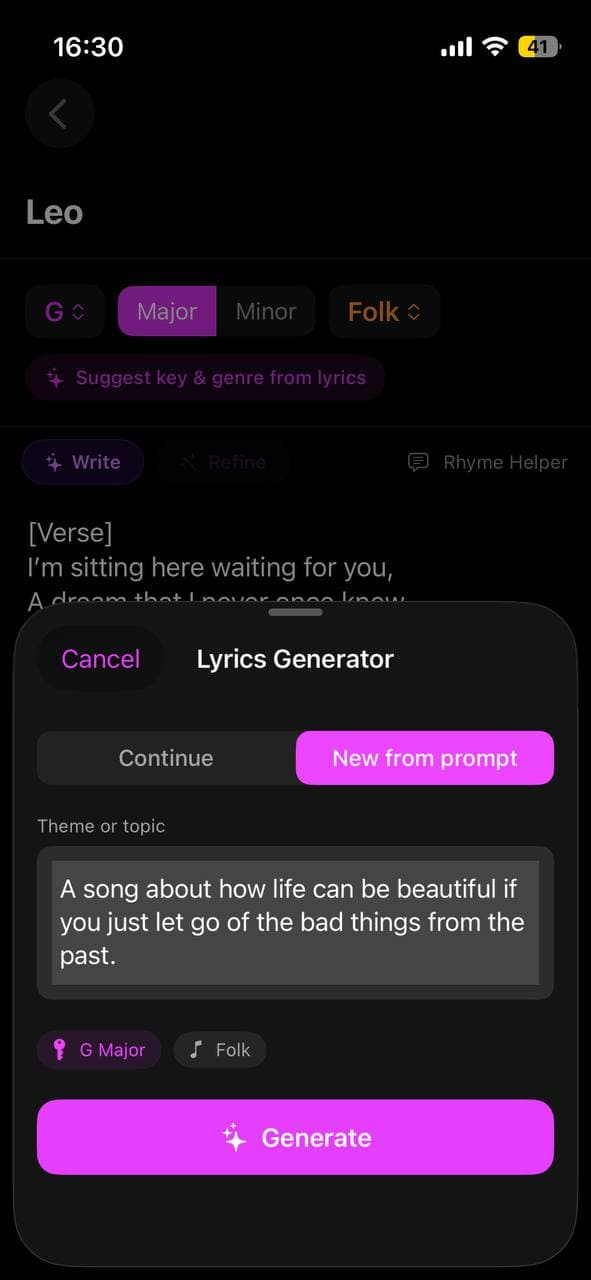
How to use it
- Open a note in the Notes tab.
- Set your genre, mood, and key.
- Tap Write with AI.
- Choose whether to generate new lyrics or continue from what you've already written.
- The generated lyrics appear in the editor — edit them freely.
Continue vs New
Continue — the AI reads what you've written and adds more in the same style, rhyme scheme, and theme. Great for when you have a verse and want a chorus.
New — the AI generates from scratch using your genre/mood/key. The editor is cleared and replaced with new lyrics.
Getting better lyrics
The mood field has the biggest impact on lyric tone. "Melancholic, loss, late summer" gives very different results from "upbeat, hopeful, fresh start".
Tip: write a one-line concept in the note first (e.g. "A song about leaving home for the first time"), then use Continue. The AI will write lyrics that follow your concept.
To get a structured song, type the section labels before generating:
[Verse]
[Chorus]
[Verse]
[Chorus]
[Bridge]
[Chorus]
The AI Lyric Writer will fill in each section while keeping the style consistent throughout.
Rhyme Helper
Stuck on a rhyme? Tap Rhyme Helper to get rhyme suggestions for any word. Tap a suggestion to copy it.